

Help Center
Guides for using your GOemail email account, answers to common questions, and how to reach support.
User guides
Step-by-step instructions for everyday use.
Email basics
Email is a way to send written messages from one address to another. GOemail is just email, with no extras to learn. If you can write a letter, you can send an email.
Every email address has the same three parts: a name, the @ symbol, and a domain. For example: jane.smith@goemail.com. The part before the @ identifies the person; the part after it (ending in something like .com, .org, or .gov) identifies where their mailbox lives. An address is not valid without both parts.
- Addresses have no spaces, and capitalization doesn't matter: Jane@goemail.com and jane@goemail.com are the same.
- Every dot and letter counts. One wrong character and the message goes to the wrong place, or nowhere at all.
- The Subject line is a short title for your message, like the front of an envelope. A clear subject helps the person decide to open it.
- Unlike a phone call, email is not instant conversation; people reply when they next check their mail. A day or two is normal.
- Messages you receive stay in your account until you delete them, so you can read them again anytime.
Signing in and out
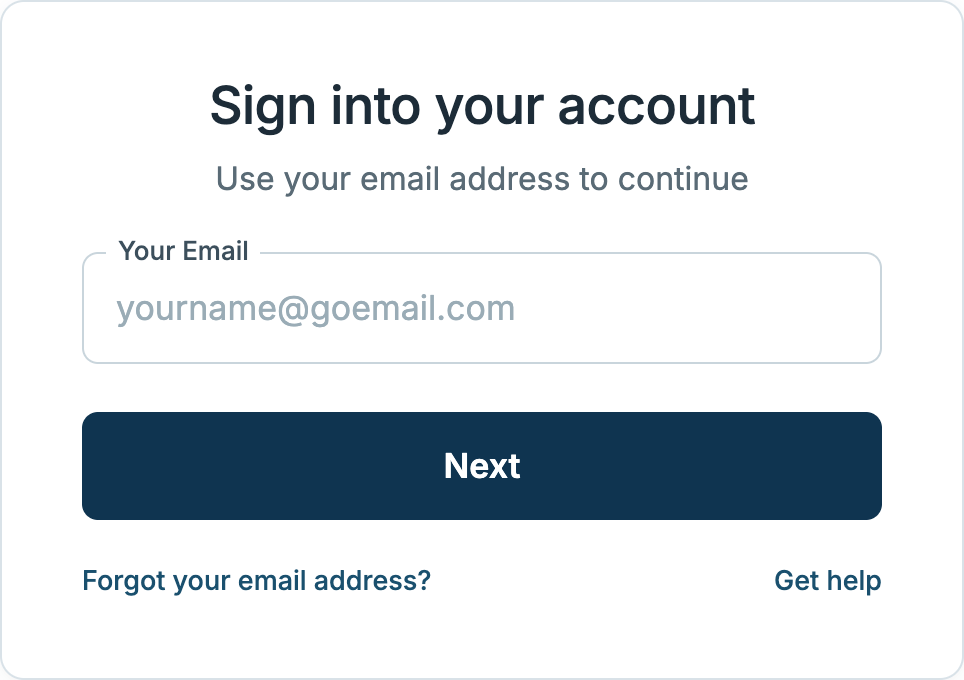
- Go to goemail.com.
- Enter your email address and select Next.
- Enter your password and select Sign in.
To sign out, select your initials at the top right of any page, then Log out. Always sign out when you are finished, especially on a shared or public computer.
Forgot your password?
This happens to everyone. Your account is not lost, and you will not lose your messages.
Passwords cannot be reset from the sign-in page. How you get back in depends on how your account is administered:
- If you sign in with a password on this site: contact the administrator for your account — the organization that sponsors your account. They can set a temporary password for you. Sign in with it, then choose a new, permanent password of your own.
- If you are taken to your organization's own sign-in page: your password is managed there, not by GOemail. Use that page's password recovery, or ask your organization for help.
Not sure who administers your account? Email support@goemail.com from any email account, or ask someone to send it for you. Include your name and your GOemail address, and we'll point you in the right direction.
Resetting your password
If your account signs in with a password on this site, you can change it at any time, even if you still remember the old one. Sign in, select your initials at the top right, choose Settings, and update your password under Profile & Security. You will be asked for your current password, then your new one twice. If you sign in through your organization's own page, your password is managed there instead and this option will not appear.
A good password is long, easy for you to remember, and hard for others to guess. Do not share your password with anyone.
Your Inbox
The Inbox is where messages sent to you arrive. Unread messages appear in bold; the box beside each message lets you select it. Select any message to read it. When you are done, use Back to return to the list, or Archive to move the message out of your Inbox without deleting it.
Your mail is organized into folders, listed on the left side of the screen, just like this:
Sending mail
To write a message, select Compose. Enter the recipient's full email address in the To field, add a short Subject describing what the message is about, write your message, and select Send.
Sent mail and delivery notices
When you select Send, a copy of your message is saved in your Sent folder, where you can re-read anything you have sent. Delivery usually takes only minutes. If a message cannot be delivered, you will receive a notice in your Inbox telling you which addresses it could not reach — the most common reason is a mistyped address, so check every dot and letter and send it again.
Drafts
A message you start but do not send is saved automatically in Drafts so you can finish it later. Open the Drafts folder, select your message, and pick up where you left off.
Spam
Spam is unwanted mail, often sent in bulk. Suspected spam is placed in your Spam folder automatically. Check it occasionally; if a real message lands there, select the box beside it and use Move to put it back in your Inbox.
Be careful with messages that ask for your password, personal details, or money, even when they look official. GOemail will never ask for your password by email. When in doubt, do not reply and do not select any links; delete the message or report it as spam.
Frequently asked questions
Quick answers to the questions we hear most.
Do I need to create an account?
No. GOemail addresses are assigned to you, so there is nothing to set up. If you have been given a GOemail address, simply sign in with it and your account is ready to use.
Can I keep my email address?
Yes. Your GOemail address stays with you, and you can keep using it going forward.
Can I email anyone?
GOemail works with standard email, so in general you can write to any valid address, and anyone can write to you. Depending on how your account is administered, delivery to or from certain addresses may not always be available. Use of the service is subject to our Terms of Use.
My message came back or was not delivered. What happened?
When a message cannot be delivered, it is returned to you with a notice (a "bounce") so you always know it did not arrive. The most common reason is a mistyped address, so check every dot and letter and send it again. Occasionally a message cannot be delivered for other reasons, such as the recipient's mailbox being full or delivery settings on an account. If a correctly typed address keeps bouncing, contact support@goemail.com.
Why is my message taking a while to arrive?
Most mail arrives within minutes, but delivery can sometimes take longer while a message is processed. If a message is not delivered, you will receive a bounce notice; otherwise, it is on its way. See our Terms of Use for details on how messages are handled.
Is there a cost to use GOemail?
For most users there is nothing to pay; the service is provided through the organization that sponsors your account. See our Terms of Use for current details on fees.
How is my information handled?
Our Privacy Policy explains what information we collect and how it is used.
Still need help?
Send us a message and we'll get back to you. Support is available during regular business hours.